F1 Power-Unit
Validation System.
A solo engineer R&D project proving what frontier AI can do for F1 powertrain testing and validation — a full Windows-native app shipped end-to-end with Claude Code as the engineering partner.
One backend, four surfaces, one rule.
Clever_PO is a monorepo with three deployment surfaces sharing a single FastAPI backend, plus a fourth deployment target — an MCP server — that exposes the same business logic as tools Claude Code and Claude Desktop can call directly. An external Data Folder, versioned by the engineering team, sits beside the codebase and carries the TR configs, limits, parameter lists, and post-process functions the runtime loads at startup. The rule that holds the whole thing together: business logic lives in FastAPI, never in a UI.
System architecture — engineering owns the rules, FastAPI owns the logic, every surface speaks the same language
The rule is that business logic lives in FastAPI. Once that holds, adding the desktop wrapper, the MCP server, and the REST API stops feeling like product work and starts feeling like wiring.
From dyno telemetry to certified pass-off.
A validation session has a fixed shape. An operator opens a subtest, the app generates the test-session metadata, ingests Parquet telemetry, evaluates engineering limits against the TR config, attributes any failures to either the Rig or the Unit Under Test, and then either certifies the unit, raises a concession with an audit trail, or fires off a structured notification email. Every step is logged through the telemetry layer; every step is callable from the MCP server.
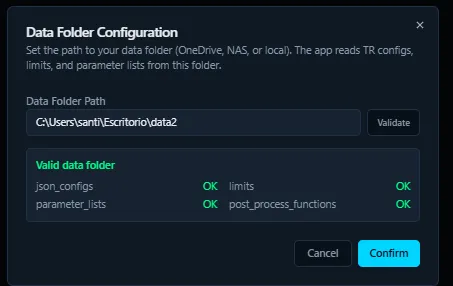
Engineering-owned Data Folder loads first.
At startup the app validates that a configured folder — on OneDrive, a NAS, or a local disk — contains the four engineering-owned subfolders: json_configs/ for TR definitions, limits/ for per-channel envelopes, parameter_lists/ for the allowed parameter sets, and post_process_functions/ for any custom analysis scripts the engineering team wants to drop in. Each is OK-checked before the app proceeds. The whole flow is designed so that changing a limit, adding a TR, or revising a parameter list does not require a code release. The right people own the right artefacts.
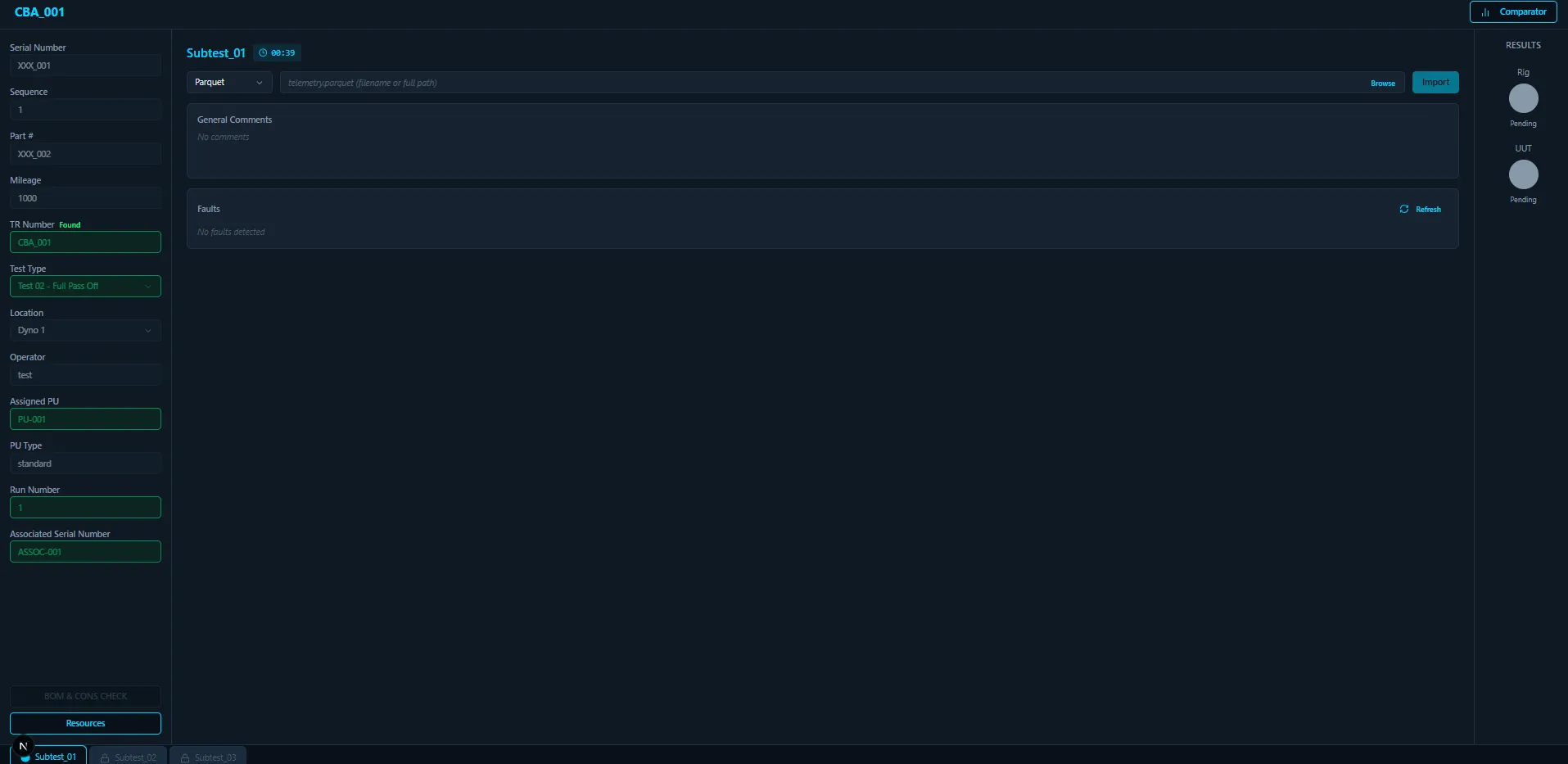
The app generates the test-session metadata.
Every test session opens with a structured metadata surface: Serial Number, Sequence, Part #, Mileage, TR Number, Test Type (e.g. Test 02 — Full Pass Off), Dyno location, Operator, Assigned PU, PU Type, Run Number, and Associated Serial Number. The TR Number is auto-looked-up against the Data Folder the moment it is typed, so a wrong code never makes it past the form. Each subtest the TR defines (Subtest_01, Subtest_02, Subtest_03) is gated behind the previous one in the bottom tab strip, preventing an operator from skipping ahead. The right-hand RESULTS panel shows Rig and UUT in Pending until telemetry has been imported and the limits engine has run.
Polars parses, the t-matrix evaluates, the Owner column attributes.
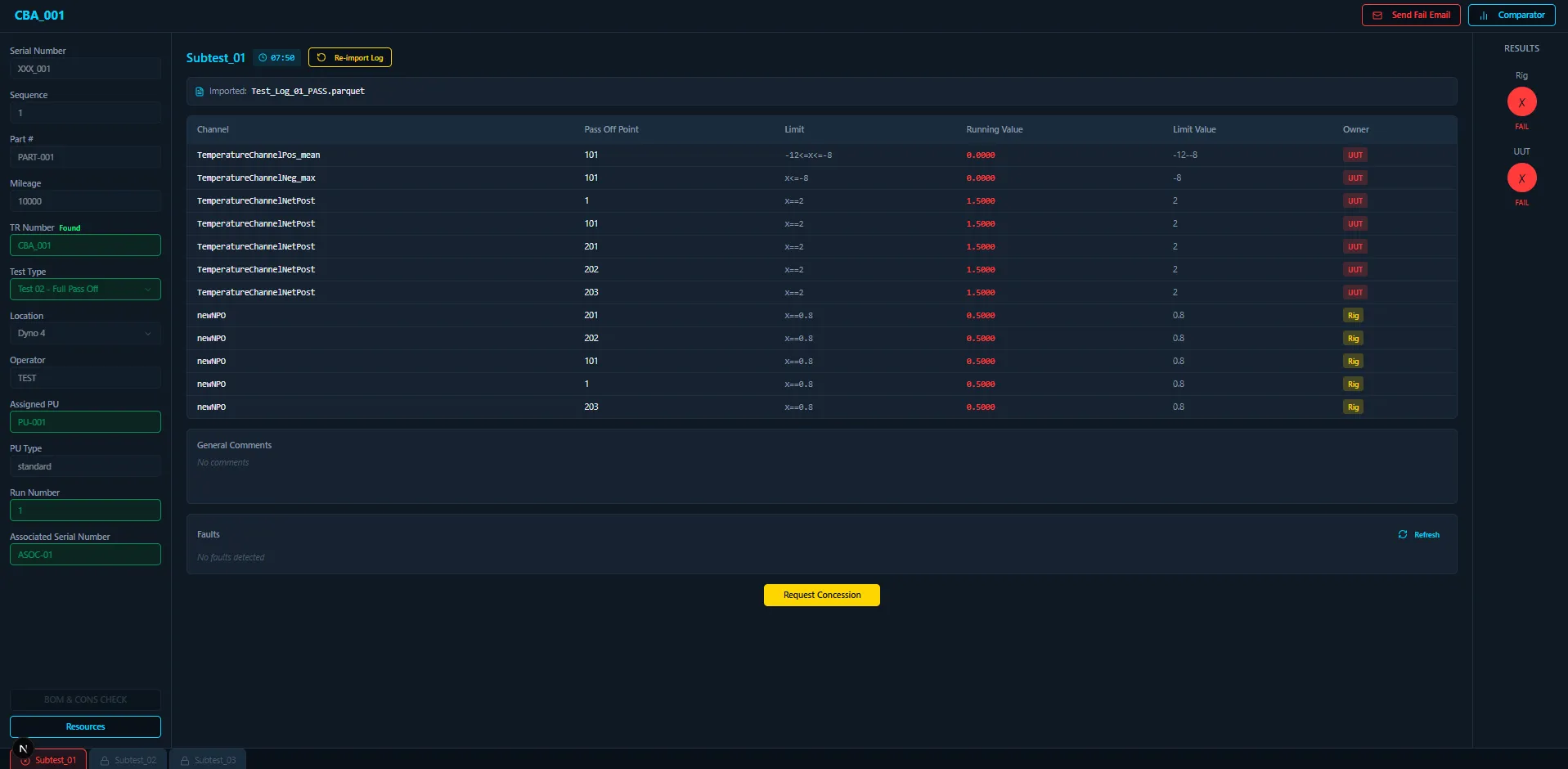
The operator selects a Parquet log and the app's high-throughput Parquet processor — Polars with pl.scan_parquet streaming — ingests it. Pandas is explicitly forbidden in the codebase; the streaming path is what lets a dyno-cell workstation handle multi-GB telemetry files without paging out. Once parsed, the limits engine evaluates each engineering channel against its configured envelope per Pass-Off Point, computes the running value, and renders the comparison table. The most distinctive column is Owner — every failure is attributed to either the Rig (test rig issue — environment, instrumentation, harness) or the UUT (unit under test — the actual hardware being validated). That classification is what makes the rest of the workflow legitimate: a Rig failure does not mean the unit is bad, and the concession path treats the two cases categorically differently.
pl.scan_parquetAudit-trailed exception handling.
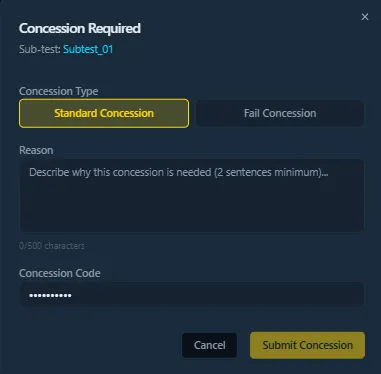
When a failure is reviewable rather than rejectable, the engineer raises a concession. The dialog enforces a Standard Concession or Fail Concession type, a reason of at least two sentences (no one-line "looks fine" approvals), and a concession code. The decision is written to the database against the test session, so a later auditor can reconstruct exactly which channel failed, by how much, and on what justification the deviation was accepted. The concession is part of the audit trail, not a paper trail that lives separately in someone's inbox.
Deterministic fail-email notification.
When a fail email is needed, the app generates it for the operator instead of leaving them to write it by hand. The body is deterministic — TR Code, Serial Number, Sub-test, ISO timestamp, Total Failures, then a fixed ASCII table of every breached channel (Channel · NPOTP · Limit · Actual · Expected · Owner), then a summary line splitting Rig vs UUT failure counts. The email opens in Outlook addressed to the engineer and test-lead distribution lists, ready to send. The same email goes out the same way every time, so the receiving engineers can grep their inbox by TR Code and reconstruct a unit's history without having to ask around.
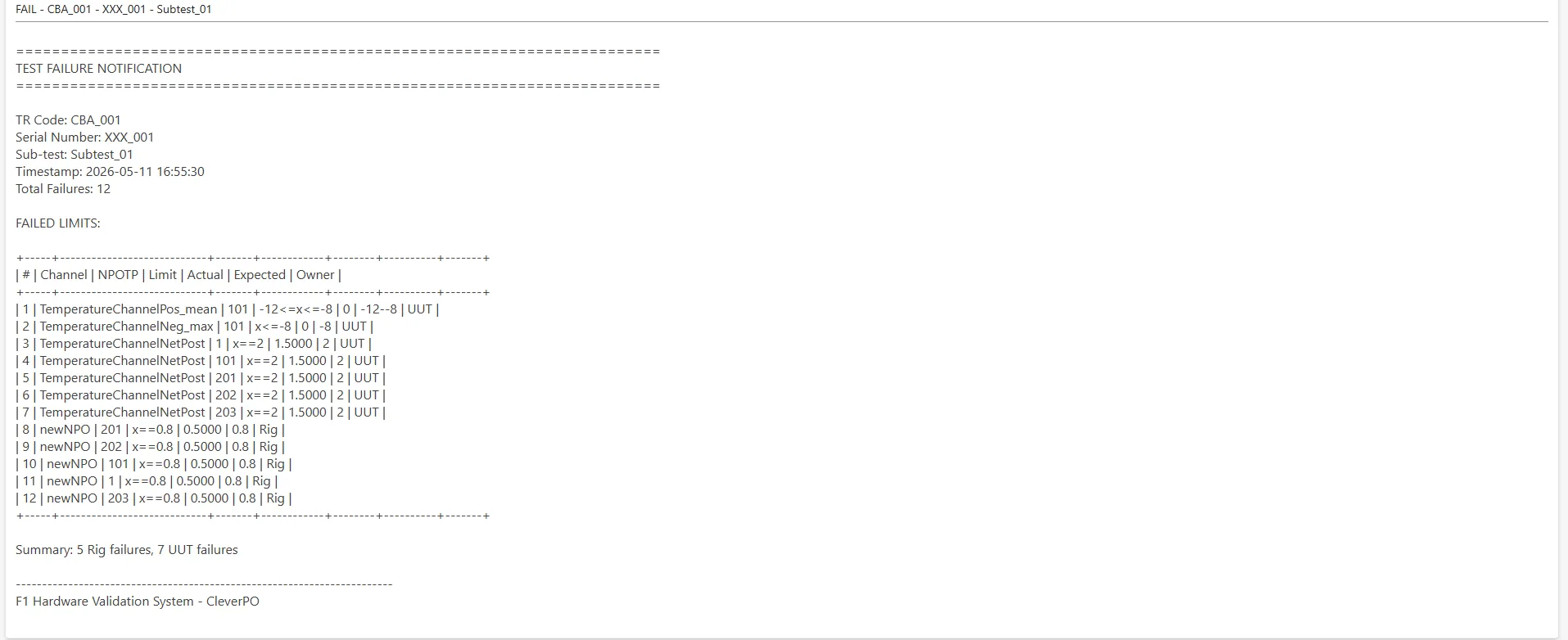
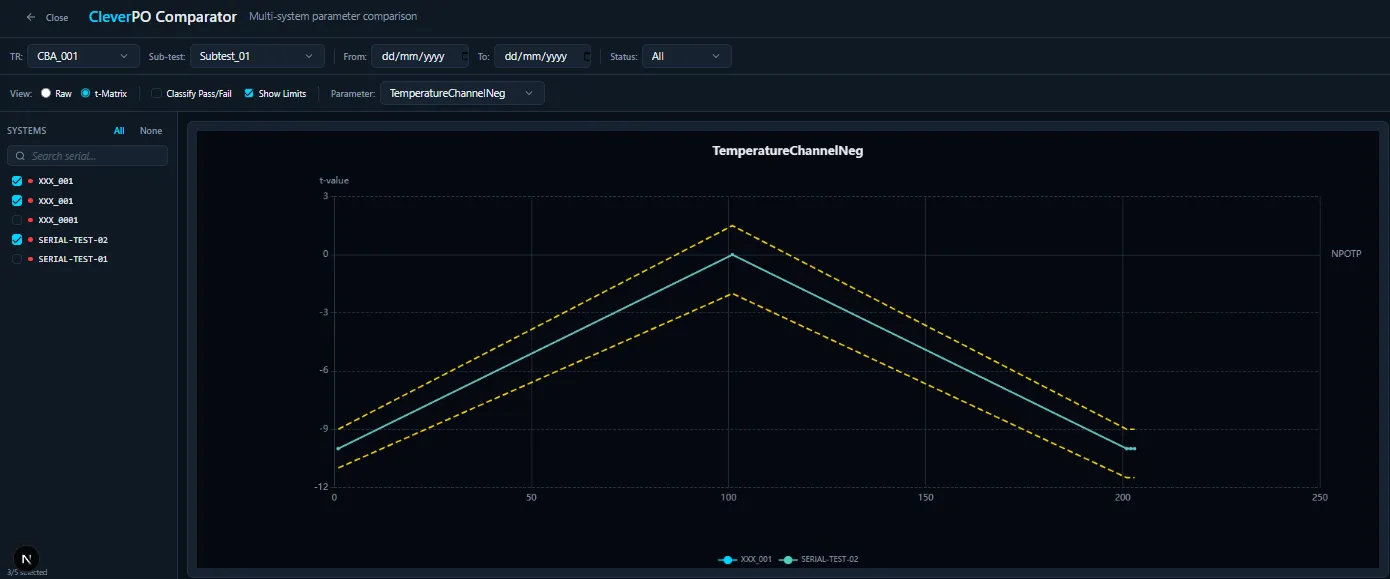
Multi-system Comparator — cross-serial trend analysis.
Once a session is recorded, it becomes part of a queryable history. The Comparator surface lets an engineer pick N serial numbers, choose a channel (for example TemperatureChannelNeg), and overlay every selected unit's curve against the configured t-matrix envelope (the dashed yellow upper and lower bounds). The Raw / t-Matrix toggle controls whether the engineer is looking at raw measurements or matrix-normalised values, and the date and sub-test filters narrow the dataset. This is the surface where a development engineer answers "is this drift unit-specific or fleet-wide?" without exporting CSVs or opening Excel.
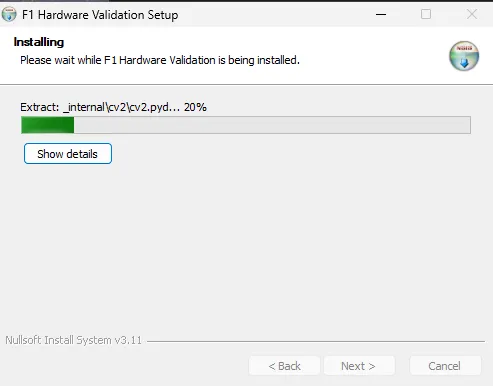
Native Windows installer — no admin password needed.
The desktop build ships as an NSIS Windows installer that bundles the Python runtime, the FastAPI backend, the Next.js UI assets, and the Tauri shell. The installer extracts everything into the user's profile so an admin password is not required, and the result is a Start-menu app that runs entirely offline against a local SQLite database — same UI, same limits engine, same MCP surface, just on a workstation instead of a server. The dyno cell does not need network connectivity to validate a unit.
The MCP server is a first-class deployment target.
Clever_PO is MCP-native by design: the same FastAPI service modules that the web UI and the desktop sidecar call are also wrapped as Model Context Protocol tools the MCP server exposes to Claude Code and Claude Desktop. An engineer can run an entire pass-off conversation from a chat session — "open subtest 1 of TR CBA_001 for serial XXX_001, import the latest Parquet, evaluate limits, tell me which channels failed on the UUT side" — and the MCP server fulfils each step by calling the exact same code path the web UI uses. There is no separate "chat surface" codebase; every new capability added to FastAPI is one thin wrapper away from being conversational.
MCP sequence — Claude Desktop drives a real validation, calling the same FastAPI service modules the web UI uses
Observability is the AI coder's nervous system.
A custom telemetry layer is built into the application from the beginning. While the app runs — both in production and during development — it emits structured events to a JSONL log file and broadcasts the same events live over a WebSocket stream. One vocabulary, two consumers. When Playwright drives the UI during development, Claude Code and a human reviewer both subscribe to the WebSocket; when a session passes silently but an internal error event fires, the loop catches the discrepancy in real time.
The dev loop — telemetry collapses "Playwright says green" + "telemetry says error" into one observable stream
A TR config, a per-channel limit, and a Polars evaluation.
All three of these artefacts live in the Data Folder — they are owned by the engineering team, versioned in their git repo, and reloaded by the Clever_PO API at startup. The Python at the bottom is what FastAPI runs against the rendered envelope.
// data-folder/json_configs/CBA_001.json — engineering-owned TR definition
{
  "tr_code": "CBA_001",
  "test_type": "Test 02 — Full Pass Off",
  "subtests": [
    { "id": "Subtest_01", "channels": ["TemperatureChannelNetPost", "newNPO"] },
    { "id": "Subtest_02", "channels": ["TemperatureChannelPos_mean"] }
  ]
}

// data-folder/limits/TemperatureChannelNetPost.json — per-channel envelope rule
{
  "channel": "TemperatureChannelNetPost",
  "owner": "UUT",
  "envelope": {
    "type": "tmatrix",
    "pass_off_points": {
      "1":   "x == 2",
      "101": "x == 2",
      "201": "x == 2",
      "202": "x == 2",
      "203": "x == 2"
    }
  }
}

// services/api/limits.py — Polars evaluates the envelope against the running value
df = pl.scan_parquet(parquet_path)
running = df.filter(pl.col("channel") == channel).select("value").collect()
verdict = evaluate_envelope(envelope, running, owner="UUT")
// → pass / fail with Rig|UUT attribution, ready for the comparator table
The decisions that shaped the architecture.
Every choice below traces back to a specific constraint or principle that the project committed to from day one. Treating these as architecture, not implementation detail, kept the four-surface build coherent across months.
pl.scan_parquet streaming for multi-GB Parquet on a workstation. The "no Pandas" rule is enforced in CI.Everything in the codebase.
Broken down by category. Choices favour typed contracts at every boundary, local execution where possible, and one backend per business action over per-surface duplication.
Backend
- PythonFastAPI orchestrator
- FastAPIHTTP + OpenAPI surface
- Pydantic v2Boundary types
- SQLModelPostgres + SQLite schemas
- Celery · Redis 7Long-running jobs
Frontend
- Next.js 15Web app
- TypeScriptTyped everywhere
- Tailwind v4Utility CSS
- shadcn/uiComposable primitives
- RechartsComparator visualisation
Desktop · Data
- Tauri 2.xNative desktop shell
- NSISWindows installer
- SQLiteLocal DB (desktop mode)
- PolarsDataFrames (no Pandas)
- DuckDBAd-hoc analytical SQL
Infra · Dev partner
- Claude CodeDevelopment partner
- MCP serverConversational deployment target
- PodmanContainer runtime
- AnsibleServer provisioning
- CaddyReverse proxy + TLS
What this build taught me.
pl.scan_parquet handles a single subtest and a full multi-GB session.